Self-Hosting n8n in Production: A Reference Architecture You Can Deploy in One Command
I run one command and get a production-grade n8n instance with HTTPS, a zero-trust tunnel, managed PostgreSQL and S3-compatible object storage. One more command and it's all gone.
It needs no SSH, no open ports, no clicking around in dashboards and no Kubernetes cathedral for a workflow engine.
This is the shape we deploy every time a client runs n8n for anything that matters. It's opinionated. It has saved us and our clients a lot of late-night calls.
The two ways people get this wrong
Most n8n deployments fall into one of two traps.
Trap one: the homelab demo. You run docker run n8nio/n8n, hook it up to your tools, and it works. Great, until a workflow hits real load, the SQLite file hits write contention, the container restarts, and you discover that "it worked at my desk" is not the same as "it works in production."
Trap two: the over-engineered cathedral. Three-node Kubernetes cluster, Helm charts, service mesh, autoscaled worker fleet, custom operators. For a tool that runs a dozen workflows. You spend more time on the platform than on the automations it's supposed to run.
There's a sweet spot between the two, and it's where almost every real client sits. Small enough that one server handles it. Grounded enough that backups, TLS, secrets, and the database are managed by someone other than you. Reproducible enough that the whole thing is declared as code.
That's what this article is.
What you get
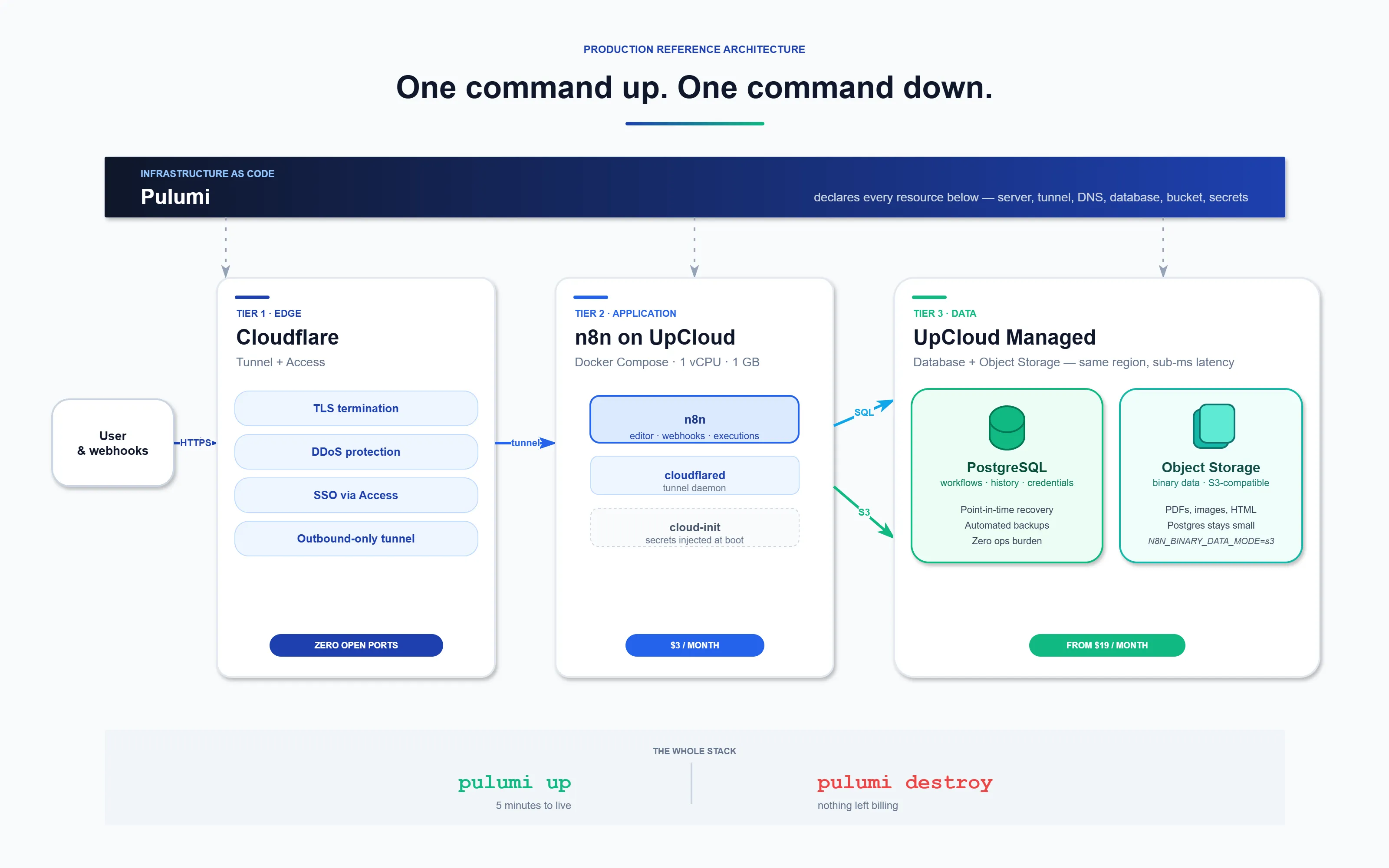
One pulumi up command provisions the full stack:
- A $3/month UpCloud server (1 CPU, 1 GB RAM, 10 GB storage, Ubuntu 24.04) running n8n in Docker
- A Cloudflare Tunnel: a zero-trust, outbound-only connection, with zero open ports on the server.
- Automatic HTTPS and DDoS protection at Cloudflare's edge
- UpCloud Managed PostgreSQL with point-in-time recovery, daily backups and no ops burden
- UpCloud Object Storage (S3-compatible) for binary data such as PDFs, images and scraped HTML
- DNS records pointed at the tunnel automatically
- Secrets generated and stored in Pulumi's encrypted state, never in plaintext
One pulumi destroy removes all of it. Server, tunnel, DNS, database and bucket are gone. Nothing is left running or billing.
The whole stack is about 180 lines of TypeScript and runs for somewhere between $3 and $25 a month depending on whether you take the single-server shortcut or the full managed-data-tier version. The architecture is identical either way; only the data tier moves.
The three tiers
Think of a production n8n deployment as three layers: edge, application, data. Each layer has a specific job and a specific failure mode it prevents.
Tier 1: Edge (Cloudflare Tunnel)
The traditional setup exposes your server to the internet. You open ports 80 and 443, configure a reverse proxy, wrestle with Let's Encrypt, manage renewals, and pray nobody scans you before you've hardened the box. Every open port is an attack surface.
Cloudflare Tunnels flip the model. The cloudflared daemon on your server opens an outbound-only connection to Cloudflare's network. Traffic flows in reverse:
User → Cloudflare (HTTPS + DDoS) → Tunnel → n8n container
Your server has zero inbound ports open, so there are no firewall rules to babysit and no certificates to renew. Cloudflare handles TLS and edge filtering. n8n's basic-auth flag is a speed bump, not auth. For anything that needs more, bolt on Cloudflare Access for SSO. Two environment variables and the editor is gated behind your identity provider.
Tier 2: Application (n8n on Docker)
One UpCloud server. Docker Compose. n8n, with the database and object storage pointed at the managed services in Tier 3. It runs without a load balancer or a worker split.
You don't need separate main and worker pods until you're running hundreds of workflows per minute, and most of our clients never get there. When you do, the same architecture scales: you add EXECUTIONS_MODE=queue, a Redis instance, and worker containers. The edge and data tiers don't change.
The one non-negotiable: don't run n8n on SQLite in production. Default deployments do. Two workflows firing at the same time and the file locks. Use Postgres from day one.
Tier 3: Data (UpCloud Managed Postgres + Object Storage)
Two stores, both managed by UpCloud:
- Managed PostgreSQL for workflow definitions, execution history, credentials, and the user table. Managed means point-in-time recovery, automated backups, version upgrades without downtime, and someone else on call when the disk fills up. The smallest plan ($19/month) is fine for any self-hosted n8n we've ever deployed.
- Object Storage (S3-compatible) for binary data. Workflows that move files (PDFs, scraped pages, image uploads) should store those blobs in object storage, not in the Postgres execution record. Set
N8N_BINARY_DATA_MODE=s3and point it at your UpCloud bucket. Your Postgres stays small. Your execution history stays fast.
Why UpCloud specifically? Three reasons. The VM, the database, and the bucket all live in the same region, so latency between them is sub-millisecond. The pricing is predictable ($3 VM, $19 managed Postgres, pennies for object storage). And their API is clean enough that Pulumi can provision the whole thing end-to-end in one pass.
If you're doing this on AWS or GCP instead, the shape is identical: RDS or Cloud SQL for the database, S3 or GCS for the bucket. The architecture holds. The cost doesn't.
Infrastructure as Code: why one command matters
The reason this setup is different from most n8n tutorials: everything is declared. Server, tunnel, DNS, database, bucket and secrets all live in a Pulumi program. You don't click through dashboards. You don't SSH in to inject the tunnel token. You don't manually paste database connection strings into .env files.
Here's what pulumi up actually does:
1. Creates the Cloudflare Tunnel. A 32-byte random secret gets generated and the tunnel is registered against your account.
const tunnel = new cloudflare.ZeroTrustTunnelCloudflared("n8n-tunnel", {
  accountId: cfAccountId,
  name: "n8n-tunnel",
  configSrc: "cloudflare",
  tunnelSecret: crypto.randomBytes(32).toString("base64"),
});
2. Fetches the tunnel token via API. This is the trick that makes the whole thing zero-touch. Instead of SSHing in to inject the token after boot, Pulumi pulls it from Cloudflare and bakes it into the cloud-init script.
3. Provisions managed Postgres and Object Storage on UpCloud, generates the connection strings and bucket credentials, and stores them in Pulumi's encrypted state.
4. Creates a proxied CNAME pointing your domain at the tunnel. TLS termination and DDoS filtering happen at Cloudflare's edge before traffic reaches your server.
5. Builds the cloud-init script with Docker install steps, a complete docker-compose.yml, and every secret injected at render time. Nothing is written to disk in plaintext.
6. Provisions the UpCloud VM with the script. Sixty seconds later the server has Docker, the compose file, and n8n running against the managed database and bucket. Nobody SSHs in and nothing is done by hand.
Deploy it
# Clone and install
cd infra && npm install

# Fill in API tokens, domain, Cloudflare account/zone IDs
cp ../.env.example ../.env && $EDITOR ../.env

# Load env and generate secrets
set -a && source ../.env && set +a
pulumi config set --secret n8nBasicAuthUser "admin"
pulumi config set --secret n8nBasicAuthPassword "$(openssl rand -hex 16)"
pulumi config set --secret n8nEncryptionKey "$(openssl rand -hex 32)"

pulumi up
Five minutes. Visit https://n8n.yourdomain.com and log in.
Tear it down
pulumi destroy
Server, tunnel, DNS, database and bucket are all removed. Your Pulumi state is the only record it ever existed.
Secrets done right
n8n encrypts credentials at rest using a single master key. The default is an auto-generated value written to the container filesystem on first boot. That means you don't know what it is, can't rotate it, and if your database gets backed up without the key, your backup is useless.
Fix it in two steps:
- Set
N8N_ENCRYPTION_KEYexplicitly. Pulumi generates it, keeps it in its encrypted state and injects it into the container at render time. You can rotate it by running one command. - No credentials in workflow JSON. Use n8n's Credentials feature, not pasted API keys in HTTP Request nodes. Workflow JSON gets exported, backed up, and sometimes committed to git. Credentials don't. Keep the wall between them.
The same rule applies to the Postgres password, the tunnel token, the UpCloud API key, and the object storage credentials. All of them live in Pulumi's encrypted state. None of them live in your shell history.
Observability, briefly
Three things are worth setting up on day one, in order of pain-if-you-skip-them:
- Alerts on execution failures. n8n can ping a webhook on failure. Point it at Slack, Discord, or PagerDuty. One workflow fails silently for a week and you've lost a week of data.
- Structured logs. Set
N8N_LOG_OUTPUT=jsonand ship stdout to Loki, Datadog, or your log tool of choice. Searchable by workflow ID is the minimum bar. - Execution retention. The default is "keep everything forever." Your Postgres execution table grows without bound and queries slow down. Set
EXECUTIONS_DATA_PRUNE=truewith 30-90 days of retention.
Prometheus metrics on /metrics and OpenTelemetry traces are both supported and both worth turning on once you're past a few dozen workflows. You can skip them on day one; by month three you will want them.
When n8n Cloud is the better choice
Self-hosting is the right call when you need a custom domain, your own database, specific compliance constraints, or the ability to spin up and tear down identical environments for staging and development.
If none of that applies and you'd rather not think about servers at all, n8n Cloud is the honest recommendation. Managed hosting, automatic updates, built-in auth, zero infrastructure. No pulumi up, no .env files, no Cloudflare tokens. Sign up, build workflows, done.
Both paths are valid. The question isn't "which one is better." It's "which one matches how you want to spend your time."
The takeaways
- Default n8n is great for prototyping, dangerous for production. SQLite under load, no TLS, secrets in workflow JSON: all fixable, none fixed out of the box.
- Three tiers, not four. Edge (Cloudflare Tunnel), application (n8n on one server), data (managed Postgres + object storage). Workers and Redis are optional. Add them when you need them.
- Declare the whole thing as code. Pulumi, Terraform, OpenTofu: pick one. If you can't destroy and rebuild the environment in five minutes, it's not reproducible.
- Managed Postgres is the single highest-ROI decision. It removes the most common failure mode for the lowest ongoing cost.
- Zero-trust at the edge beats open ports. Cloudflare Tunnel + Access is the easiest real auth story you'll ever deploy.
n8n is a great tool and we run it ourselves. But "great tool" and "production-ready out of the box" are two different things. Do the extra hour of setup, or run one pulumi up, and it will serve you for years.
Want to try the exact stack? The full Pulumi source is on GitHub. Clone it, set your API keys, deploy in five minutes.
Need help with your setup? We build and run production automation infrastructure for clients. Reach out and let's talk about your use case.
Disclosure: this post contains affiliate links for UpCloud and n8n Cloud. We only recommend tools we use ourselves on production workloads.